

Testing is an essential part of the software development lifecycle. Any software application needs to be tested for its functional and non functional requirements. Testing helps to examine if the software application matches all requirements and standards, ensuring customer satisfaction. Various aspects of applications are checked using different tests, classified into functional and non functional testing categories.
Traditionally, software testing was limited to analyzing functional requirements only. A few years back, non functional requirements often didn’t get the proper attention in the initial test cycles. But now, non functional testing is finally getting the spotlight it deserves.
This crucial part of testing examines all the security and performance issues in a detailed manner. Overall, it makes applications perform more efficiently even under high traffic.
This guide covers the whole taxonomy in one place: what separates functional from non-functional testing, the functional types (unit, integration, system, acceptance, smoke and sanity), the non-functional types (load, stress, volume, scalability, security, compatibility and more), how long the performance tests take and what typically breaks during each, plus the tools for the job.
If you are new to the field, read it top to bottom. If you came for one type, the headings below are in the order a release actually exercises them.
Looking for a tool for the visual side of testing? Diffy compares screenshots of your pages across releases, browsers and screen sizes. The free plan includes 500 screenshots a month.
What Is Non Functional Testing?
Non functional testing is the testing of those parts of an application or product that are not connected with a particular function or a user action. It is performed to verify the non functional requirements of software and applications, such as reliability, performance, security, usability, compatibility, etc. Non functional testing covers all the features that are not covered in functional testing.
Non functional testing aims to
- Increase the efficiency, maintainability, usability, and portability of the product.
- Help mitigate the production risks related to non functional aspects of the application or product.
- Optimize the installation, set up, execution, monitoring, and management of a product.
- Collect product metrics for internal research and development.
- Optimize and enhance the knowledge of technologies used and product behavior.
Characteristics and Attributes of Non-Functional Testing
Not sure how to structure your non functional testing process? Make sure it checks the boxes below:
- Non functional tests should be measurable. Otherwise, you won’t be able to get much insight from it.
- Exact figures are unknown at the beginning of the demand phase
- Specifications should be prioritized. Remember to test for very specific things if you want the results to be actionable.
- Quality characteristics should be recognized properly in software engineering and the testing phase is exactly what you need to examine them.
So what exactly are you testing during non functional testing? These are the attributes that make up the scope of testing and app or a website:
- Availability
- Scalability
- Interoperability
- Portability
- Efficiency
- Security
- Reliability
- Flexibility
- Survivability
- Integrity
- Usability
- Reusability
If done right, non functional testing can answer some of the most crucial questions related to the look and performance of your application:
- How does the software application perform under stress?
- How does the software application respond when too many users log in simultaneously?
- How secure is the application?
- Is the software application capable of recovering from any disaster?
- Does the software application behave similarly in different OS or environments?
- How much traffic could the application handle?
In other words, this type of testing is precisely what you need to make sure your application’s performance is on par. Of course, it’s not the only type of testing you’ll have to perform. Let’s look at its counterpart for a bit:
Key Differences between Functional and Non functional Testing

Both functional and non functional testing aim to deliver an application that is in line with your business requirements. But there are differences between these two.
Both are broken down by type further down this page: functional testing types and non-functional testing types. For the two categories side by side, see functional vs. non-functional testing.
Functional testing refers to the software testing that verifies if the product features work according to the business requirements. Moreover, it identifies all areas where performance does not fulfill expected results. It describes the execution/behavior of the software application.
Non functional testing, on the other hand, checks the broader quality concerns and verifies all non functional aspects. It describes the usability or performance of the software system.
Together, functional and non functional tests help you check if your application meets your business goals/requirements, as well as those of your users. They form a comprehensive testing environment and a crucial step before any app launch, as well as throughout the application’s life cycle.
Let’s look at these differences more in-depth and add some examples to help you make better sense of them:
- Functional testing is about how well a system works, while non functional testing is about how well a system responds. For example, functional testing tests the process for inserting data, while non functional testing tests the speed at which the data is saved.
- Functional testing is based on customers’ requirements, while the other is based on customers’ expectations. Modern businesses clearly differentiate between the requirements and expectations of customers. Non functional testing has become non-negotiable after the growing emphasis on customers’ expectations.
- Functional testing is conducted before an application goes live. Particular types of non functional testing, such as documentation and maintenance testing, need to be performed after the application goes live.
- It is difficult to perform an efficient and thorough non functional testing process without the right tools. However, this is not an issue with functional testing. It can be performed manually with the same efficiency.
- Functional testing specifies which functionalities need to be tested, while non functional testing defines how they need to be tested.
- Under functional testing, you may test if the username and password allow users to log in to the application. However, under non functional testing, you check if the user can log in to the application within 3 seconds of providing a username and password.
Functional versus Non-Functional Testing — the Bird’s-Eye-View
Let’s draw a clear distinction between functional and non functional testing:
| Functional Testing | Non-Functional Testing |
|---|---|
| • Tests each feature and function of the application. • Is based on customer requirements, • It verifies the actions and operations of an application. • It verifies the accuracy of the application against expected output. • Checks what an application does. • Helps to optimize the application behavior. • Can be performed manually. • The implementation plan for functional testing is described in the system design document. • Its requirements are easy to specify. | • Tests non functional aspects, such as reliability, usability, and performance. • Is based on customers’ expectations. • It verifies the behavior/execution of an application. • It verifies the behavior of an application at different load conditions. • Validates the performance of an application. • Non functional testing is usually automated. • The implementation plan for non functional testing is defined in system architecture. • Defining non functional requirements is difficult. |
To make the difference more clear, let’s discuss it using an example.
| What Is Functional Testing? | What Is Non-Functional Testing? |
|---|---|
| • When a user enters valid credentials, the app login works. • A user receives a message, and an email notification is sent when notifications are on. • The uploader accepts a JPG file when it is under 1MB • The setting page loads when the setting menu is clicked. | • The dashboard loads within 3 seconds after login. • The email notification is sent within 5 minutes. • When multiple files are loaded at the same time, queue them. • The settings page has a similar appearance as the rest of the GUI. |
Functional Testing Types
The main types of functional testing are:
Don’t worry — I know they don’t mean much to you right now. But we’ll take a quick look at each of them so by the end of this guide, you’ll know what’s what easily!
What Is Unit Testing?
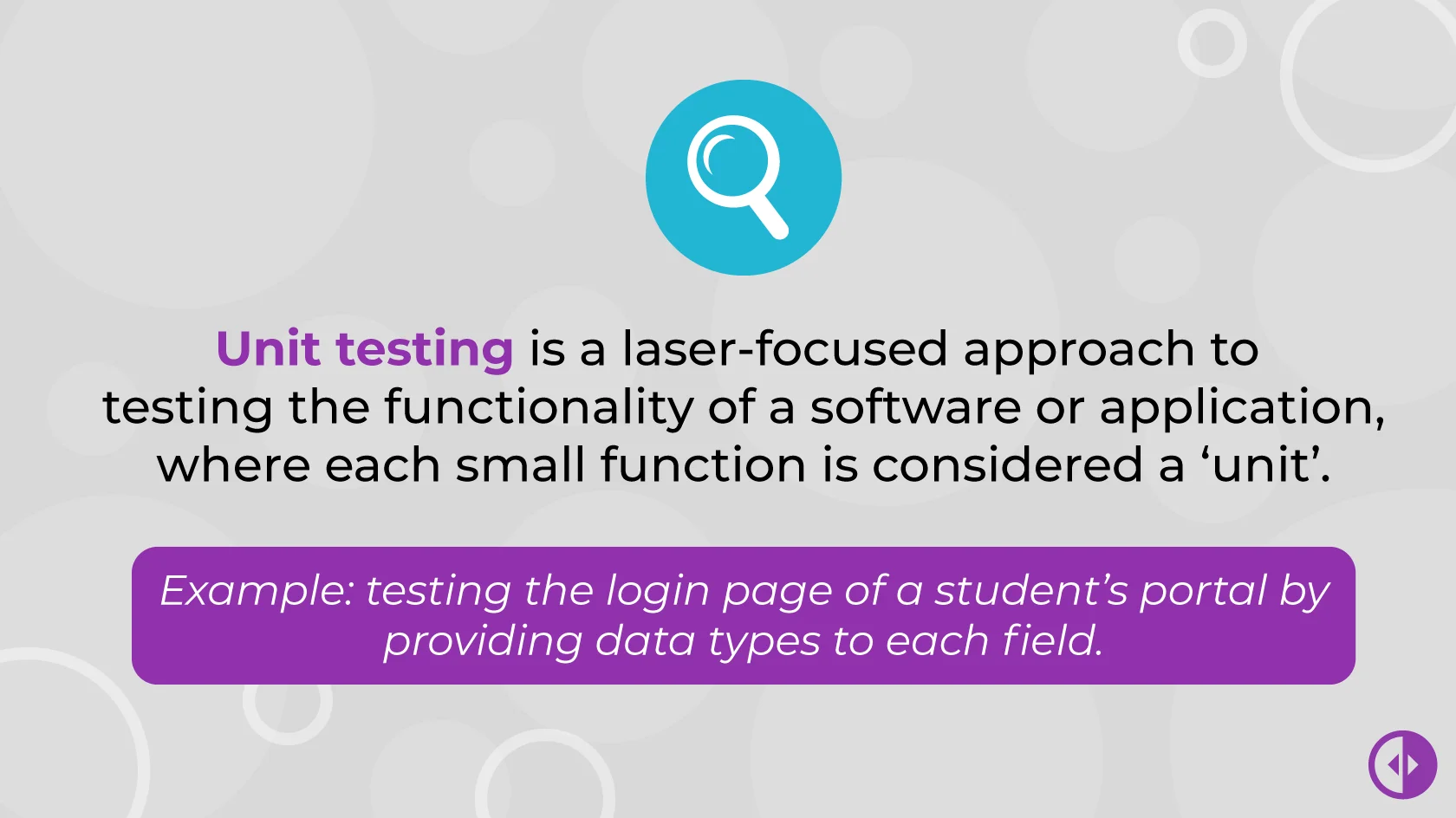
The functionality of software can always be divided into smaller modules where each completed action can be regarded as a module. This is what unit testing does — it tests an application’s every function (unit).
According to QA veterans, the unit is the smallest part of an application that is testable. Therefore, this type of testing is laser-focused to ensure the flawless functionality of each application module. Unit testing is the first building block in the functional testing hierarchy.
What Are the Objectives of Unit Testing?
Unit testing ensures that the best practices are followed in developing a solution. As a microscopic analysis of the whole code is performed, the objectives of unit testing include:
- Maximizing the quality of the written code.
- Ensuring that the code written in each unit is not only reliable but also reusable.
- Making the documentation more convenient and more to the point.
As each module of the application is tested rigorously against all possible input scenarios, unit testing aids the transitions to the next stage of functional testing, i.e., integration testing.
What Is an Example of Unit Testing?
Let us look at an example featuring a banking application. Its different functionalities can be categorized into login, adding a payee, and making a bank transfer for its unit testing.
Each of these functionalities is tested against several scenarios that lead to positive and negative results. For instance, if the login page has three fields, including the user’s mobile number, username, and password, each field is tested by providing some data types.
A QA engineer will test the login page by entering an integer data type in the mobile number field. If that number is an acceptable one, the login page will take the user to the application’s homepage.
After that, the tester will test the login page by providing text data in the mobile number field. This will generate an error message, as a phone number field cannot include letters. All such scenarios will be run against the username and password fields, and the outcomes will be recorded.
Following the same lines, other application functionalities are tested.
What Are the Recommended Tools for Unit Testing?
Tools that are recommended for unit testing include:
What Is Integration Testing?
Integration testing is what follows unit testing in the chain of functional testing. The functions/units tested separately are grouped, and the interaction between two modules is tested.
For instance, an integration testing cycle might test the interaction between login and checkout modules in an eCommerce application.
What Does Integration Testing Aim For?
Software applications are rarely developed by a single engineer. More often than not, you’ll have whole engineering teams work on the development of different application modules.
Therefore, when there is a need for a couple of these modules to interact, some bugs might appear. Modules created by different teams may not “speak” to each other as coherently and clearly as you need them to.
This is where the integration testing comes into play, as it aims to expose such defects and ensure that the application is functioning as per the specified requirements.
What Is an Example of Integration Testing?
To develop a better understanding of integration testing, let us consider the example of an online shopping website. Some of the functions of this website re:
- Signing up.
- Logging in.
- Adding items to the shopping cart.
- Proceeding to checkout.
- Paying via credit/debit card or other methods.
In integration testing, a QA engineer will look at whether the items in the shopping cart are retained in case of re-login. This would expose any defects in the interaction between login and checkout modules.
Similarly, the engineer might test if the shipping fee is populated in addition to the price of the items in the cart.
What Are the Recommended Tools for Integration Testing?
Some of the widely used tools for integration testing re:
What Is System Testing?
System testing is defined as testing the functionality of a complete application build. It is one of the critical functional testing types as it is a scale-up of the integration testing.
Where integration testing tests the functionality of a couple of modules, system testing tests how the entire build of the application performs when the modules interact. This is why system testing comes after integration testing is done.
What Purpose Does System Testing Serve?
System testing is done to ensure that the whole system’s functionality is in line with the documented specifications. In this phase, testing is used to check the functionality of all the modules interacting with each other.
This is where any flaws in the complete workflow of the application are found and rectified. So if you were thinking about skipping this step, you may want to reconsider.
Example of System Testing
System testing includes end-to-end testing of the whole system (as the name suggests). To see it in action, let’s go back to our online shop example.
System testing will test whether the website works as intended on the most popular web browsers. Next, you’ll want to test pretty much anything you can think of:
- Do the website’s logo and widgets appear as intended?
- In this phase of testing, QA engineers will test that the signup, login, homepage, shopping cart, checkout, and payment pages are working as specified.
- Do the sort and search functionalities of the website work properly?
What Are the Recommended Tools for System Testing?
Widely used tools for system testing include:
What Is Acceptance Testing?
Have you gotten through all the types of functional testing I have listed above? Congratulations, you have reached the end of your quest! Acceptance testing is the last leg of our journey.
Acceptance testing comes last because it is the point where end-users test developed software to identify whether it meets the needs of the business. This type of testing acts as a decisive point for the approval of the software.
It is done by actual users, customers, and people from business operations to identify if the software’s goals are met.
Acceptance testing is further divided into:
User acceptance testing has a process of its own — see the UAT checklist and process for how to plan and run one.
Alpha and Beta Acceptance Testing
Alpha acceptance focuses on the internal features of the software to identify any evident defects.
In contrast, beta acceptance testing is an external pilot test to test whether a product can be approved for commercial use.
Contract Acceptance Testing
In this type of testing, the developed software is tested against the specifications in the contract. This is where the client gets to know whether the business logic of the whole system is working properly and in accordance with the company’s needs.
Regulation Acceptance Testing
Most types of software fall under certain regulations and rules. This is especially true if you’re developing software for highly-regulated industries like healthcare or finance.
In this phase, you will make sure that your product adheres to all the laws and regulations of every country you plan to use the software in.
Operational Acceptance Testing
Operational acceptance testing is performed to assess how ready the developed software is for operational use. This way, all aspects of the acceptance testing are covered.
What Are the Recommended Tools for Acceptance Testing?
Recommended tools for acceptance testing include:
What is Smoke Testing?
Smoke testing is one of the testing techniques performed in the initial stage of the SDLC. It is recommended that the smoke testing is carried out as soon as a new build is received.
Why? Because smoke testing aims to ensure that the critical functionalities of software are working the way they are required to.
What Is the Difference Between Smoke and Sanity Testing?
While smoke testing finds out whether the critical functionalities of the software are working correctly, a sanity test finds out whether the changes implemented in the code are giving the required output.
To understand the difference, let’s look at this side-by-side list of the key features.
| Type | Objective | Example |
|---|---|---|
| Smoke Testing | Identify that the acute functionalities of the software are working as per the specified requirements | A smoke test for online shopping website will check if: • The website opens • Does clicking the login button take the user to the homepage? |
| Sanity Testing | Identify whether the changes made to the code in order to introduce a feature are working expected | A common use case is where data validation is applied so that the password does not accept less than five characters. A sanity test will check if the application opens if the user provides less than five characters in the password. |
Non-Functional Testing Types
Here are some of the most common types of non functional testing. For how to run stress, failover and usability tests in practice, see how to perform stress, failover and usability testing below.
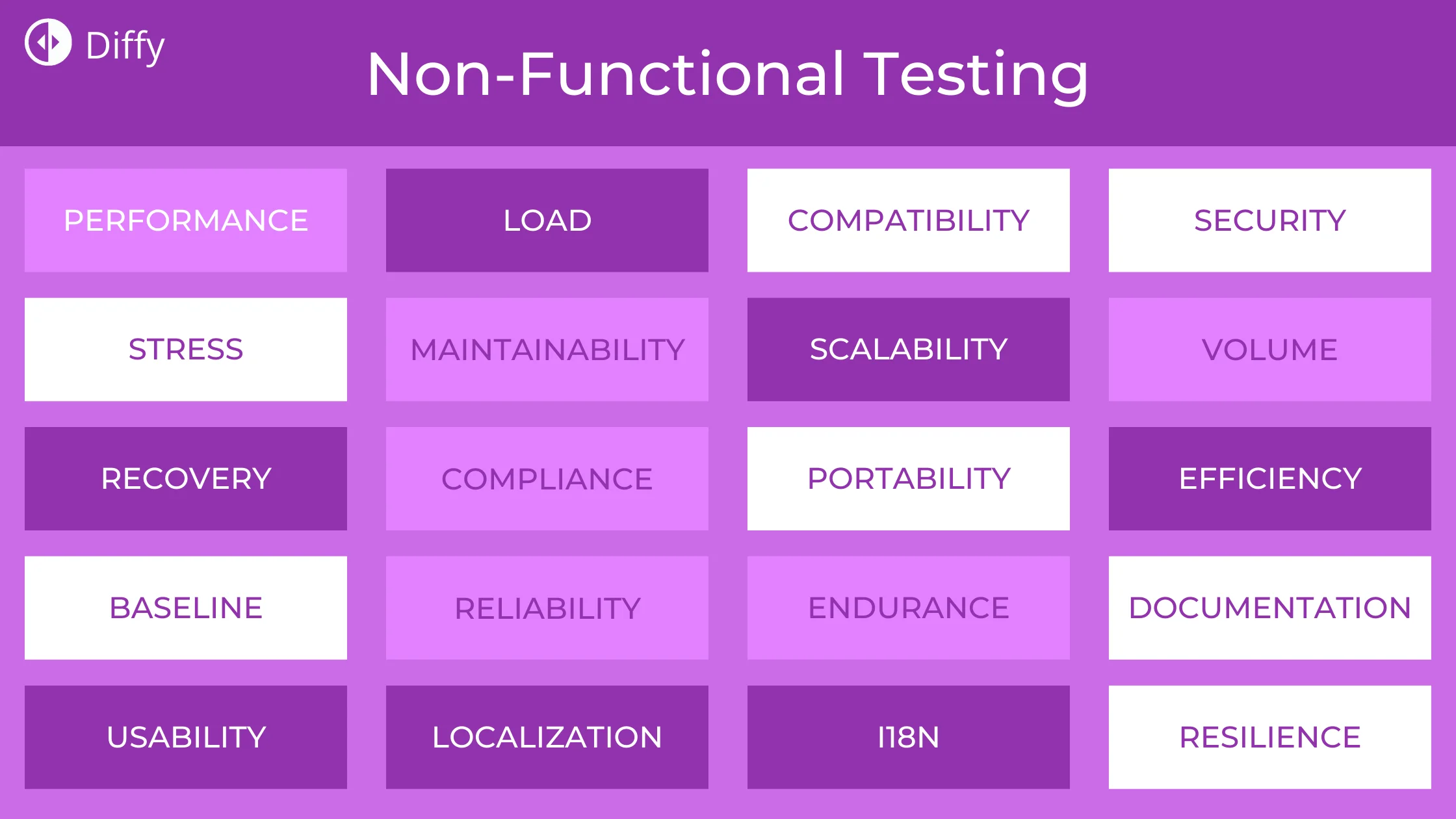
Let’s take a closer look at them.
What Is Performance Testing?
Performance Testing is used to assess the overall performance of an application.
The process includes measuring the application’s response time. This test might be performed as a part of system testing or integration testing.
- It’s a methodology that incorporates distinct testing methods to test the requirements for scalability, reliability, stability, and other aspects of software product quality.
- An assessment under performance testing is one of the primary components that ensure the effective operations of a product after launch.
- Performance testing is a subset of efficiency engineering, ensuring that applications are performed effectively under the anticipated load.
- It determines efficiency, velocity, reliability, and other essential system components. Moreover, two or more applications can be compared, and their information transfer rate, bandwidth, system velocity, and other factors are evaluated.
What Is Load Testing?
Load testing is an essential type of non functional testing. It is performed to assess an application’s performance under common situations.
The regular usage condition is repeated with multiple users to ascertain the consistency of an application’s response time. It helps to discover the system’s ability to handle pressure when multiple users log in simultaneously. Make sure to conduct a test on a dedicated server creating a substitution of the actual environment and a realistic database.
- The team emphasizes testing applications using different testing technologies after the completion of the development process.
- Load testing is conducted during the software lifecycle testing to guarantee the software’s reliability and stability.
- It is the simplest form of performance testing, and it is carried out under a specified predicted load condition to understand the application behavior.
- The load test principle is to raise the load continually until it meets the threshold and then evaluate the efficiency and behavior of the application with these load increases.
Load testing is one of four performance testing types. For how long each takes and what typically breaks during each, see how long each performance test takes below.
What Is Volume Testing?
Volume testing assesses the application’s performance and how it transfers information and data in the context of an enormous amount of data. You can inspect the data volume beyond which the application will halt the function.
- The volume testing subjects the application to a massive amount of data burden. The aim is to measure and assess the behavior, response, and effectiveness of an application. It is related to the testing of applications subjected to elevated data volumes.
- Volume testing aims to demonstrate that the data volume in its objectives can’t be handled accurately.
- It’s a part of the non functional trials group to evaluate the application’s efficiency by increasing the information volume. The volume may generally be the size of a volume-tested file interface or a database.
What Is Compatibility Testing?
Compatibility testing lets you validate if the application or product is compatible with different devices, browsers, and operating systems, all at widely different configuration strengths.
- Compatibility testing is vital for a software product or application to analyze its compatibility with its anticipated operating setting, including different operating systems, platforms, hardware, and software, to implement its planned functionality efficiently.
- It is performed to verify and check the compatibility of a website or product with various artifacts, such as hardware platforms, customers, browsers, and operating systems. Compatibility testing is a major component of the software testing lifecycle.
- It is performed at the early stages of quality assurance and allows the team to ensure that all customer-requested requirements are met and integrated with the final product.
For the full breakdown of compatibility testing types and the tools we recommend, see our compatibility testing guide.
What Is Scalability Testing?
Scalability testing refers to testing an application in a way that assesses how it performs when the number of users is scaled up or down. It allows organizations to test their server’s capability to handle an approximated increase or decrease in user traffic, volume, or data.
- It is a type of performance testing that guarantees the application’s flexibility for growing end-users requirements.
- The scalability test aims to evaluate the adaptability ability of the application to grow with the increasing demands to operate efficiently.
- Scalability testing can be considered a form of non functional testing that guarantees the application’s scalable quality.
What Is Security Testing?
Security testing is one of the most crucial non functional testing types. Security testing ascertains all the potential threats, risks, and vulnerabilities in a system and ensures that it protects the application from malicious code while maintaining the expected functionality.
- It is used to check and verify the safety characteristics of an application, including the detection of security failures or other vulnerabilities. Security testing ensures that data and information stored in the application are protected, confidential, and authentic.
- Real testing is essential during the software development process. The reason is centered around running an application to detect bugs. It is necessary because attacks are highly critical and allow hackers to get server database data.
What Is Localization Testing?
Localization testing verifies the application works well in different locales. Localization testing aims to test the content and graphical user interface of the application and determine if it is ideal for a specific region or not.
- Localization tests are intended to validate the quality of local attributes targeting a specific culture/region/population so that a localized version operates efficiently. It is expected to meet the requirements and expectations of a specific region.
- It emphasizes monitoring the modification and adjustment of the production environment to meet the specific users’ requirements of those who leverage goods in that particular region.
What Is Configuration Testing?
Configuration testing is a type of non functional testing that tests the performance of software applications on a machine with different software and hardware configurations, such as browser, operating system, supported drivers, etc.
- Configuration testing is a unique type of software testing that is conducted in laboratories.
- All systems with several hardware settings are available in labs. Each system in the lab has a testable application version to be published, and a test set is carried out.
- Since establishing a test laboratory with expensive heavy-duty systems can be difficult, various businesses outsource this to organizations that specialize in conducting such tests.
How to Perform Stress, Failover and Usability Testing
The types above cover what each test measures. Here is how the less obvious ones are run in practice.
Load, Stress, Volume and Scalability Tests at a Glance
| Test | Objective | Example test case |
|---|---|---|
| Load testing | Check behaviour and find bottlenecks under the maximum expected number of concurrent users | Measure response time with 1,000 simultaneous users |
| Stress testing | Push beyond expected limits to find the breaking point and see how the system recovers | Increase concurrent users until the application fails, then time the recovery |
| Volume testing | Check behaviour when very large amounts of data are stored, queried and displayed | Load a large dataset and measure how long key pages and queries take |
| Scalability testing | Check how well the system handles a sudden spike in users | Simulate the traffic spike of a midnight sale on an online shop |
For how long each of these takes and what typically breaks, see the section below.
Failover Testing
Failover testing checks that a system can switch to backup resources when a server or component fails, and how long that takes. It matters most for systems where downtime is expensive, such as banking or telecom applications.
A typical failover test:
- Identify the likely points of failure, such as the primary database or application server.
- Estimate the cost of downtime at each point, to decide how fast recovery needs to be.
- Deliberately take the component down in a test environment.
- Measure how long the system takes to switch to the backup and whether any data or transactions are lost.
- Fix what was slow or lost, and repeat until recovery meets your target.
Usability Testing
Usability (UX) testing checks how easily real users can reach their goals. It can’t be fully automated, because the point is to watch people use the product.
- Recruit participants who match your real users, ideally people outside your team.
- Write tasks based on real goals, for example “add a new payee” or “make a transfer” in a banking app.
- Run and record the sessions, noting where people hesitate, make mistakes or give up.
- Review the recordings, list the broken or confusing flows, and propose fixes.
How long each performance test takes, and what breaks
The types above say what each test measures. These are the two questions teams actually ask when planning a test window.
Load testing
How long it takes.
The duration of any type of performance testing largely depends on how you perform it. Manual testing is nearly impossible when testing a product against peak load requirements.
Consequently, seasoned testers automate load testing. A load testing cycle should ideally take 10 minutes. Of course, depending on the project, the tester’s experience, and the software to be tested it can take a lot more or a lot less.
What can break.
Finding the breakpoint in the application is actually the sole purpose of performing load testing. It aims to identify what amount of web traffic is bearable for the application.
Therefore, while performing load testing, you need to find the point where the server crashes. If you can find that point, you are good to go.
However, the process is not as easy as it may sound. This is due to the presence of various other factors. For instance, the response time of the application is ranked among the critical performance metrics. A greater response time means an increased bounce rate, which will swing visitors away from your website. Apart from that, various comments on your website from the end-users regarding the slowness of the application also act as a trigger point in this regard.
Stress testing
How long it takes.
Again, there is no set limit for stress testing — it all depends on the nature of your project. For example, you can test the system processing speed by copying a 5GB file in Microsoft Word.
The purpose is to check the system under abnormal conditions. However, stress testing is a time-consuming process as it is divided into five steps that include:
- Planning a stress test
- Creation of automation scripts
- Execution of the scripts
- Results analysis
- Tweaking based on the results
What can break.
Stress testing is a type of testing that focuses on evaluating the breaking point of an application. It does not only check for software breaking points but also for the ones related to hardware.
Therefore, like load testing, the server can crash during stress testing. Apart from that, you can identify memory leaks under abnormal conditions. In addition, stress testing aims to identify if the abnormal conditions lead to security threats for your application.
This completes our discussion on stress testing. Time to move towards the next performance testing type which is volume testing.
Volume testing
How long it takes.
Like the other testing types, the time needed to perform volume testing depends on the requirements of the project. Although automation makes it significantly more convenient, volume testing remains a time-consuming process.
Why? As you may have guessed, it’s because you need to test the system from multiple aspects. Loading huge amounts of data in the existing database, checking whether the data is loading correctly or not, and identifying if the added data has affected the system’s performance are some of the metrics you can gauge your application against in volume testing.
What can break.
As mentioned earlier, to identify the breaking points in volume testing, you need to focus on the performance testing metrics for it. While performing this type of testing, you can identify several points that might be problematic, like application response time and data loss when the data is dumped into the DB.
Furthermore, volume testing allows you to reach the point where the DB crashes or becomes irresponsive. This helps you to plan for unforeseen circumstances by following a preemptive approach.
Scalability testing
How long it takes.
Thanks to the automation testing suites, scalability testing has become much faster in recent years. A testing cycle can take several minutes depending on the size of the system being tested.
But, as always, the time needed to perform the test depends on the system’s requirements and on the extent you need to scale it up to. For example, if you have to test the system behavior at 20 concurrent users and then scale it up to 40 users, it will take much less time than starting at 2000 users and scaling up to 4000.
What can break.
Scalability testing can expose vulnerabilities in network usage, CPU/memory usage, throughput, web server performance, and the application’s response time.
Non-Functional Testing Examples
Ready to start your testing process? Use these examples of non functional testing to ensure that your process touches on all the essential areas:
| Examples | Objectives |
|---|---|
| Application response time | Evaluate the loading time |
| Application processing time | Assess the application’s ability to take the lowest possible time to perform key functions. |
| Application response across various networks | Assess the application’s response to network changes. |
| Application battery usage | Determine if the application reduces the device battery usage. |
| Application scalability and stability | Verify the application’s performance while staying in the background. |
| Application’s interaction with device sensor | Does the application respond appropriately with several device sensors, such as accelerometer, GPS, etc? |
| Application interaction with device notifications, interruptions, or multi-tasking | Does the application work as expected during device interruptions or when the device gets notifications from other applications? How accurately does it respond to the device operating system’s multi-tasking actions? |
| Application response with a strength reduction | Evaluate if applications works are required during network fluctuations. |
| Application query and reporting time | Determine if the application does query resolution and error reporting in minimum time. |
Tools for Non-Functional Testing
No single tool covers every type of non-functional testing. Choose by the kind of test you need to run:
| Type of test | Tools | Notes |
|---|---|---|
| Load, stress, volume and scalability | Apache JMeter, Tricentis NeoLoad, OpenText LoadRunner Professional, RadView WebLOAD, Loadster | JMeter is free and open source; the others are commercial products. |
| Visual regression (the visual side of compatibility and change testing) | Diffy, BackstopJS, Playwright screenshot assertions | Compare screenshots across browsers, screen widths and releases. |
| Usability | Sessions with real users, recorded and reviewed | Tools such as Maze, UserTesting, Lookback and Optimal Workshop help recruit participants and record sessions. |
Apache JMeter
Apache JMeter is a free, open-source tool from the Apache Software Foundation for load and performance testing. It generates traffic at the protocol level (HTTP, JDBC, LDAP, JMS, FTP and others), so it measures how your servers respond under load. It does not render pages in a browser or run JavaScript, so it won’t tell you what users see.
Tricentis NeoLoad
NeoLoad is a commercial load and performance testing platform, originally built by Neotys and now part of Tricentis. It targets teams that run performance tests continuously as part of their delivery pipeline.
OpenText LoadRunner Professional
LoadRunner is one of the longest-established commercial performance testing tools. Formerly sold by Micro Focus, it is now an OpenText product (OpenText Professional Performance Engineering).
RadView WebLOAD
WebLOAD is a commercial load and performance testing tool from RadView.
Loadster
Loadster is a hosted load testing service for websites, web applications and APIs.
Paessler Webserver Stress Tool
Paessler’s Webserver Stress Tool is an HTTP load and stress testing application for Windows. Paessler now offers the final version as freeware and no longer provides in-depth technical support for it, so it suits quick checks better than a long-term testing setup.
Diffy
Diffy is our visual regression testing tool, so it covers one part of this list: checking that pages still look right. It takes screenshots of your pages in Chrome or WebKit (the engine behind Safari) at the screen widths you choose, compares them between environments or before and after a change, and highlights the differences. It does not do load, stress, security or failover testing; use the tools above for those.
What it does include:
- Comparison of staging and production, or of the same site before and after an update
- A comparison mode that recognises content that has only shifted down the page, alongside pixel-perfect comparison
- Masking, cookies, custom CSS and JavaScript, and mock content to keep dynamic pages stable between screenshots
- Notifications by email, Slack or webhook
- Figma design uploads to compare designs with the built pages
The free plan includes 500 screenshots a month, with no credit card required.
Wraith
Wraith is the open-source screenshot comparison tool created by BBC News developers. Its repository was archived in January 2026 and is marked as no longer maintained, so it is not a good choice for new projects. If you want an open-source option, see our comparisons of BackstopJS and Playwright.
Related reading
- Automation testing 101 — when automating a test pays for itself, and the main types of automated test.
- Regression testing: a step-by-step action plan — how to prioritise what to retest on a site you did not build.
- Compatibility testing — the types, and the tools for checking across browsers and devices.
- What visual regression testing is — the check that catches what functional tests cannot: the page still works, but it no longer looks right.
Final Words
Non functional testing is an essential component of software testing. It plays a vital role in the success of an application or software to build up better customer relationships, and therefore, it should not be neglected. No testing process is considered complete without non functional testing as it ensures the application behavior is acceptable and in line with the business requirements.
This guide has covered both halves of the taxonomy in detail. For the visual part of it — checking that pages still look right after a change, which no functional test catches — read what visual regression testing is and how it works, or start with Diffy’s free plan at 500 screenshots a month.