

Upsun (formerly Platform.sh) does something developers love: every pull request gets its own preview environment, built from the branch, with a copy of the parent environment’s data. The link shows up right in the pull request. A reviewer opens it, checks the page the ticket was about, and approves.
What nobody checks is everything else. The CSS change for the new pricing table also moved the footer on two hundred other pages. The template fix for articles broke an old landing page at 640px. The preview environment showed all of it — nobody opened those pages.
This guide sets up visual regression testing for every Upsun pull request. A GitHub Action waits until Upsun has deployed the preview environment, Diffy screenshots the preview and production at every breakpoint, compares them page by page, and reports the result on the pull request as a check. It takes one workflow file, two repository secrets and the Diffy GitHub app. The setup follows our Upsun GitHub Action docs; this article walks through each step and what reviewers see once the check lands on a pull request.
Why Upsun preview environments suit visual testing
A visual regression test answers one question: what did this change do to the pages? It answers it best when the two versions of the site differ only by that change. Upsun’s pull request environments get you close to that by default.
- Same content. When the GitHub integration creates an environment for a pull request, the environment starts with a copy of its parent’s data — that is the
pull-requests-clone-parent-dataoption, on by default. If your pull requests target the production branch, the preview has the same pages, menus and media as production. Right after the environment is created, a difference between the two comes from the code in the pull request, not from content an editor published. - Same stack. Upsun describes preview environments as having the same software configuration as production, on smaller hardware. The PHP version, the services and the build steps all come from the same configuration files in your repository.
- One environment per pull request. There is no queue for a shared staging server, and every pull request gets its own result.
- No cleanup. The environment is rebuilt on every push and deleted when the pull request is merged.
Compare that with the usual alternative — one shared staging site whose content drifts further from production every week — and it is easy to see why content drift is one of the most common sources of false positives in visual testing.
One caveat: the data is copied when the environment is created, so a pull request that stays open for two weeks slowly drifts away from production too.
How the integration works
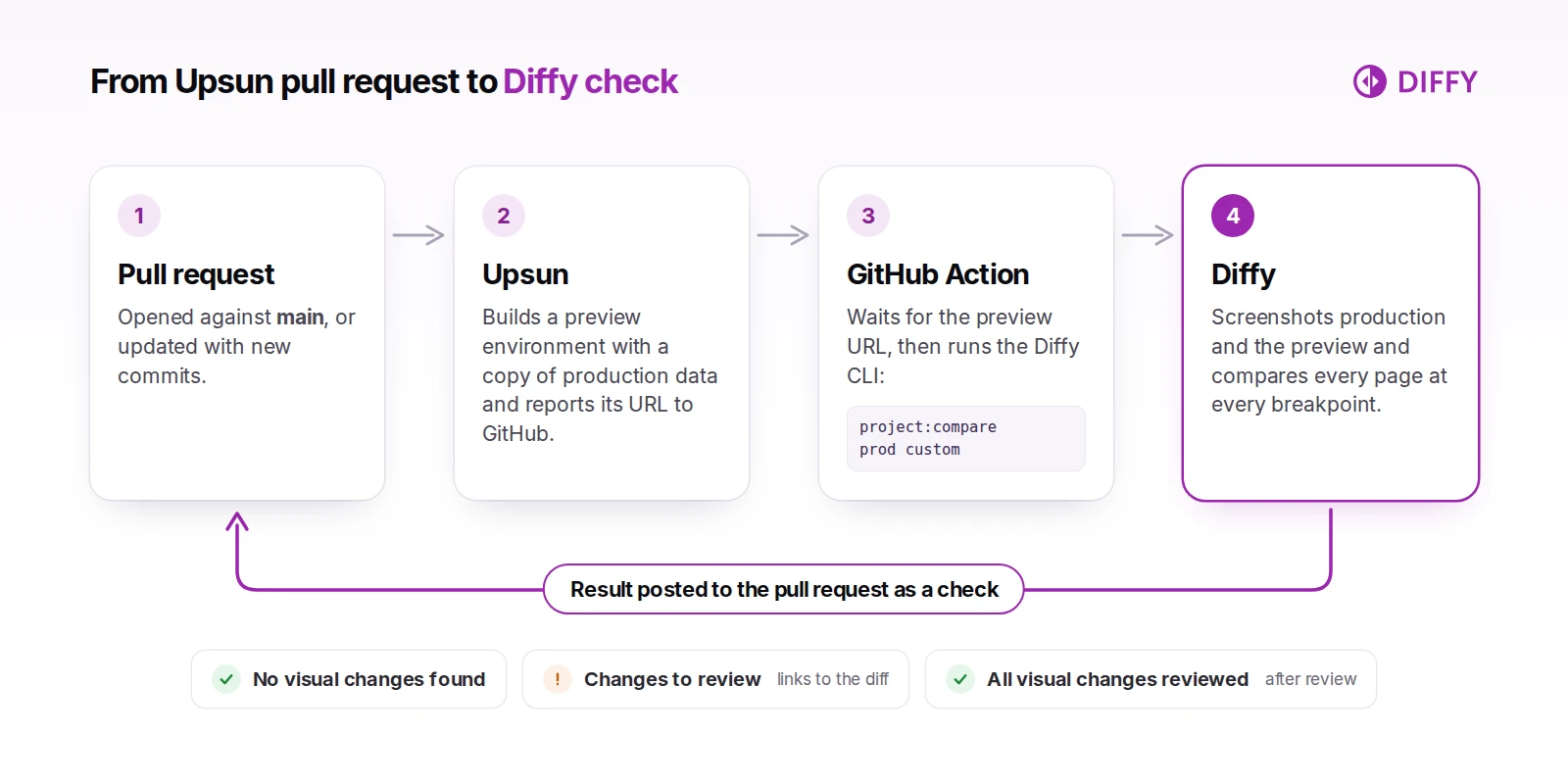
- You open a pull request against
main, or push new commits to one. - Upsun’s GitHub integration builds (or rebuilds) the pull request’s environment. Once it is deployed, Upsun reports the environment’s URL back to GitHub as a commit status — the link you already see in your pull requests.
- A GitHub Actions workflow waits for that status and reads the URL from it.
- The workflow installs the Diffy CLI and starts a comparison: fresh screenshots of production against fresh screenshots of the preview URL, for every page and breakpoint in your Diffy project.
- Diffy creates a check on the pull request’s head commit. The check is in progress while screenshots are taken and compared, then completes with either “No visual changes found” or the number of changes waiting for review, plus a link to the diff.
One detail surprises people the first time: the workflow run finishes seconds after it starts the comparison. It does not wait for the screenshots, so it does not hold a GitHub runner while they are taken. The result arrives as its own entry in the pull request’s checks list, named Diffy check "<your project name>".
Set it up
You need admin access to the GitHub repository, an Upsun project and a Diffy account — a free one is enough to try this.
1. Let Upsun build your pull requests
If Upsun does not build your pull requests yet, add the GitHub integration to the project. Its defaults are what this setup needs: build-pull-requests creates an environment for every pull request, and pull-requests-clone-parent-data copies the parent’s data into it. Drafts are built too; build-draft-pull-requests is also on by default.
2. Create the Diffy project
Create a project with your production URL, then add the pages to test: paste a list, or scan the site’s sitemap. Resist adding all 4,000 URLs. The homepage, the main navigation, the conversion pages and one page per template catch most regressions for a fraction of the screenshots. New projects start with three breakpoints — 640, 1024 and 1200 pixels — and our responsive design testing guide covers which others are worth adding.
Before you connect the project to pull requests, run a comparison or two by hand and deal with anything that changes on its own: cookie banners, carousels, dates, embedded feeds. Masks, JavaScript snippets and mock content in the project settings handle these, and our guide to avoiding false positives walks through them. Every flaky element you fix now is a false alarm you will not see on every pull request later.
3. Connect Diffy to the repository
Install the Diffy GitHub app on the repository; it is what lets Diffy create checks there. Then, in Diffy, open Project settings → Notifications → GitHub and paste the repository URL, in the form https://github.com/<owner>/<repo>.
The same screen has an optional checkbox: In addition to the check post a comment to the pull request with diff progress and results. With it on, Diffy also comments on the pull request when the comparison starts — number of pages, breakpoints, total comparisons and an estimated time — and edits that comment with the result when it is done. Each comparison posts its own comment, so a pull request that gets five pushes collects five of them; for many teams the check alone is enough.
4. Add two repository secrets
Create an API key on the keys page in Diffy. Your project ID is the number in the project’s URL: app.diffy.website/#/projects/<id>.
In GitHub, go to Settings → Secrets and variables → Actions and add two repository secrets:
DIFFY_API_KEY— the API keyDIFFY_PROJECT_ID— the project ID
5. Add the workflow
Create .github/workflows/diffy.yml with this content. It is the workflow from our docs plus a permissions block, explained below:
name: "DiffyPullRequestTest"
run-name: "DiffyPullRequestTest"
on:
  pull_request:
    branches:
      - main

permissions:
  contents: read
  statuses: read

jobs:
  trigger-diffy-job:
    runs-on: ubuntu-latest
    steps:
      - name: 'Wait for psh and get target url'
        id: get-target-url
        uses: platformsh/gha-retrieve-psh-prenv-url@main
        with:
            github-token: ${{ secrets.GITHUB_TOKEN }}

      - name: 'Install and Run Diffy'
        id: install-diffy-cli
        shell: bash
        env:
          diffy_api_key: '${{ secrets.DIFFY_API_KEY }}'
          diffy_project_id: '${{ secrets.DIFFY_PROJECT_ID }}'
        run: |
          wget -O /usr/local/bin/diffy https://github.com/diffywebsite/diffy-cli/releases/latest/download/diffy.phar
          chmod a+x /usr/local/bin/diffy
          diffy auth:login $diffy_api_key
          diffy project:compare $diffy_project_id prod custom --env2Url="${{ steps.get-target-url.outputs.target_url }}" --commit-sha="${{ github.event.pull_request.head.sha }}"
Merge it into main. From then on, pull requests against main get a Diffy check as soon as Upsun has deployed their environment. To watch it work, open a pull request with a deliberate visual change; a new button color is enough.
Here is the whole flow on a demo Drupal site:
What the workflow does
The trigger. on: pull_request with branches: main runs the workflow when a pull request targeting main is opened or reopened, or receives new commits — GitHub’s default activity types for pull requests. If your production branch has another name, change it here.
Waiting for Upsun. platformsh/gha-retrieve-psh-prenv-url is published under Platform.sh’s GitHub organization, which is where the “psh” in the name comes from. It polls the commit statuses of the pull request’s branch until the integration reports a successful deployment, then outputs the environment URL as target_url. It recognizes statuses from both the Platform.sh and the Upsun integration, checks every 10 seconds, and gives up after 300 seconds by default.
Permissions. The wait step reads commit statuses with the workflow’s GITHUB_TOKEN. Many repositories get a read-only token by default — GitHub made it the default for new organizations and personal repositories in February 2023. That token covers repository contents and packages, and on a private repository it cannot read commit statuses, so the wait step would fail even though Upsun deployed fine. The permissions block grants exactly what the step needs: statuses: read for the deployment status and contents: read to look up the commit.
Installing the CLI. The next step downloads the latest diffy.phar release, makes it executable and logs in with your API key. The phar needs PHP 8.2 or later, which the ubuntu-latest runner has; on a self-hosted runner, install PHP, the GitHub CLI and jq first (the wait step uses the last two).
The comparison. diffy project:compare <id> prod custom compares two environments of the project. prod is the production URL from your project settings; custom is any URL you pass with --env2Url, in this case the preview environment. Both sides are screenshotted fresh on every run. --commit-sha passes the pull request’s head commit: Diffy attaches the check to that commit and uses it to find the pull request for the optional comment.
Because the command runs without --wait, it returns as soon as Diffy has created the comparison. You would add --wait only if a later step in the same job needed the result; with the check on the pull request, most teams do not.
Reviewing the result
The check is where reviewers start. “No visual changes found” means Diffy found no differences between production and the preview on any tested page at any breakpoint, outside the areas you have masked, and the reviewer can skip the visual review. If there are changes, the check completes as action required with the number of changes waiting for review, and Details opens the diff in Diffy.
In Diffy, reviewers go through the changes page by page and breakpoint by breakpoint, with production and the preview side by side, and mark each change as expected or as a bug. When the same change shows up on several pages, Diffy offers to mark them all at once — handy for a header change that touched every page. If the AI summary is switched on for the project, the diff also gets a written summary that separates critical changes from minor ones.
When every change has been reviewed, Diffy updates the check to success: “All visual changes reviewed”, with the number of bugs marked, if any. Note what that means: marking a change as a bug still counts as reviewed. The idea is that the author fixes the bug and pushes, which starts a new comparison.
Make visual review a merge requirement
If visual review should block merging, add the Diffy check as a required status check in the branch protection rules for main. GitHub only lets a pull request merge when its required checks are successful, skipped or neutral. A Diffy check with changes waiting for review is action required, so the pull request stays blocked until someone reviews the changes in Diffy. GitHub lists the checks that have run in the repository recently, so set this up after the first pull request has been through the workflow.
Frequently asked questions
Does this work with projects that started on Platform.sh? Yes. Platform.sh is now Upsun, and the wait step recognizes deployment statuses from both the Platform.sh and the Upsun integration. Diffy itself only needs the preview URL.
Can I compare the preview with staging instead of production?
Yes. Use stage custom instead of prod custom and set the staging URL in the Diffy project’s settings. dev works the same way.
Why is the workflow green while the Diffy check is still running? The workflow only starts the comparison, which takes seconds. Screenshots and comparisons run on Diffy’s side, and the Diffy check stays in progress until they are done.
A pull request did not get a Diffy check. What should I look at?
Start with the workflow run. If the wait step timed out, Upsun did not report a deployed environment in time: the build took longer than the wait step’s five-minute default timeout, the pull request is a draft and drafts are not built, or — on Upsun Fixed, whose plans include a set number of preview environments — there was no free environment left. If the workflow did not run at all, look for a merge conflict: GitHub does not run pull_request workflows until it is resolved. If the Diffy step reports an error, check the two secrets and your monthly screenshot usage. And if everything is green but no check appears, make sure the Diffy GitHub app is installed on that repository and the repository URL in the project’s GitHub settings matches it.
How long does a comparison take? It depends on how many pages and breakpoints the project has. If you turn on the pull request comment, Diffy includes an estimated time when the comparison starts.
We are on Pantheon, not Upsun. Is there an equivalent? Same idea, different trigger. On Pantheon the natural moment is a deploy to the Test environment; here is our GitHub Actions workflow for Pantheon. For other hosts, see visual regression testing in GitHub Actions and the full list of Diffy integrations.
Upsun already builds an environment for every pull request; the screenshots are the part nobody has time for. Start a free Diffy project, add your production URL and the pages that matter, and your next pull request will get its first visual check.