

The biggest pain point of full-page screenshot visual regression testing is false positives: the run comes back red, you open the diff, and the only thing that changed is the day of the week in the footer or which slide the carousel happened to land on.
They are worth taking seriously, because the damage compounds. A suite that cries wolf on every run is a suite people stop reading, and the moment your team starts clicking “approve all” to clear the queue, the real regression sails through with everything else.
The good news is that almost every false positive falls into one of a handful of categories, and each category has a specific fix.
What actually causes false positives
Before reaching for a tool, it helps to name what you are looking at. In our experience testing thousands of sites, the noise comes from five places:
- Dynamic content. The latest three articles, a “products you may like” block, view counters, relative timestamps like “2 hours ago”. The layout is identical; the words and pictures inside it are not.
- Motion and timing. Carousels, animated headlines, counters that tick up, Lottie files, CSS transitions that have not finished. The page is never in quite the same state twice.
- Third-party embeds. Maps, video players, ad slots, chat widgets, social feeds. You do not control what renders inside them and often it is a different frame each time.
- Environment differences. Production has real content, staging has half-migrated content. One has analytics, the other does not. These diffs are real, they are just not about your code.
- Capture-level problems. The screenshot itself is unfair: a cookie banner fired on one run, a font loaded late, an image never resolved, or your CDN served a challenge page to the screenshot bot.
The first four are page problems. The last is a capture problem, and it needs a different response — more on that below.
Decide what you want before you fix it
For each noisy element, answer one question: do I need to test this, or only what is around it?
If the element is genuinely part of what you are testing, replace its content with something stable. If it is not — an ad slot, a third-party map — cover it or remove it and move on. Teams get into trouble when they mask everything that moves, because a suite that ignores half the page will happily pass while that half is broken.
Option 1: Mask the element
Masking draws a solid block over an element so its interior never contributes to the comparison, while its size and position still do. That last part matters: if a masked video player suddenly doubles in height and pushes the footer down, you still get a diff.
This is the right choice for embeds you do not control. Diffy masks iframes automatically, so maps and video players are usually handled before you touch anything. If you want to do it by hand, the pattern is to overlay each element with an absolutely positioned block:
const iframes = document.querySelectorAll('iframe');

iframes.forEach((iframe) => {
   const overlay = document.createElement('div');

   overlay.style.position = 'absolute';
   overlay.style.background = '#74B31B';
   overlay.style.width = `${iframe.offsetWidth}px`;
   overlay.style.height = `${iframe.offsetHeight}px`;
   overlay.style.top = '0';
   overlay.style.left = '0';
   overlay.style.zIndex = '9999';
   iframe.parentElement.style.position = 'relative';
   iframe.parentElement.appendChild(overlay);
});
Option 2: Remove it with CSS
Sometimes an element should not be in the screenshot at all — a chat bubble, a cookie banner, a promo bar that only appears on production. Injecting CSS to hide it is the simplest fix available:
.chat-widget,
.cookie-banner {
   display: none !important;
}
Be deliberate about display: none versus visibility: hidden. The first removes the element from the flow and everything below it shifts up; the second leaves the gap. If the element is an overlay, either works. If it sits in the document flow, visibility: hidden usually produces a more faithful screenshot.
Option 3: Freeze it with JavaScript
Animation is the category people underestimate. A carousel is not “sometimes different” — it is different on essentially every run, which means every page containing one is permanently red.
The fix is to run JavaScript before the screenshot that puts the component into a known state. Stop the slider and pin it to a chosen slide, set counters to a fixed value, jump animations to their final frame:
const swiperElements = document.querySelectorAll('.swiper-initialized');

swiperElements.forEach((swiperElement) => {
   setTimeout(() => {
       swiperElement.swiper.allowSlideNext = false;
       swiperElement.swiper.allowSlidePrev = false;
   }, 25);
});

swiperElements[0].swiper.slideTo(0, 0);
We have written a full set of these snippets for the widgets that cause the most trouble in stabilizing Elementor sites for visual regression testing — sliders, animated headlines, hotspots, countdowns and Lottie animations. The same approach works on any site; only the selectors change.
The same JavaScript hook lets you go the other way and capture states you otherwise could not, like screenshots of tabs, mobile menus and sliders, or elements buried in shadow DOM.
Option 4: Replace the content with fixtures
Masking and removal both have the same cost: you stop testing the thing you covered. For a block of real editorial content — a news teaser, a product grid — that is a poor trade, because the layout of that block is exactly what you want to catch breaking.
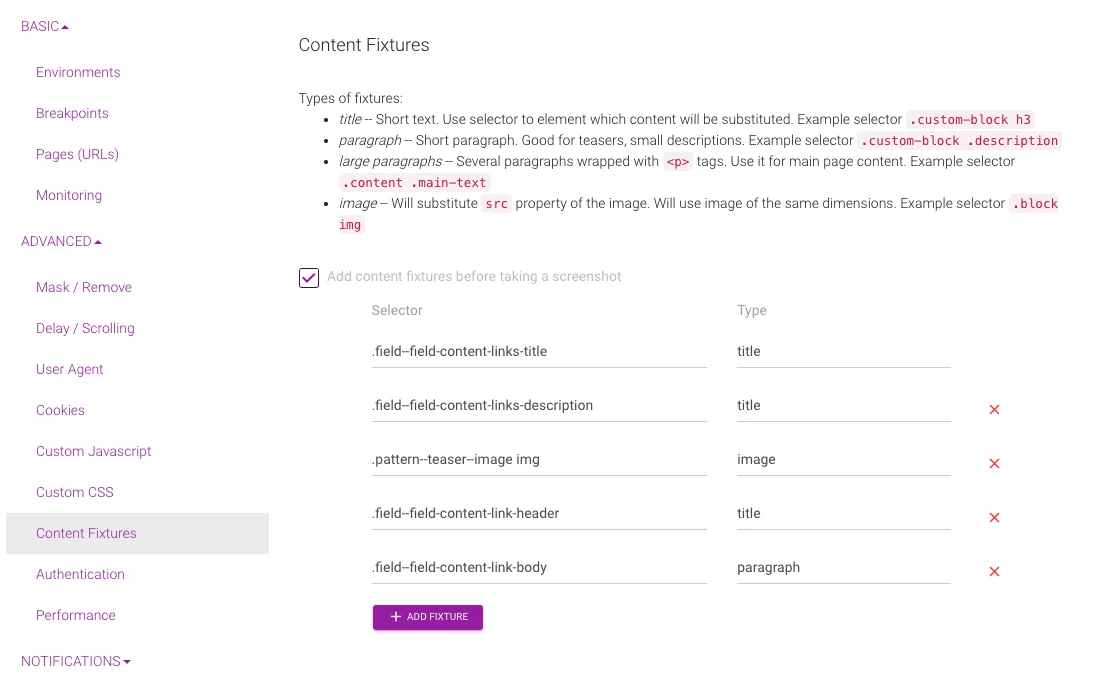
This is what we built Content Fixtures for. Right before the screenshot is taken, Diffy injects JavaScript that swaps the content of the elements you nominate for fixed placeholder text and images. The block keeps its markup, its styling and its position in the page. Only the words and pictures inside it become predictable.
Here is the original block, with content that changes whenever an editor publishes:
 Original site with dynamic elements
And the same block after applying title, paragraph and image fixtures:
 Content Fixtures Applied
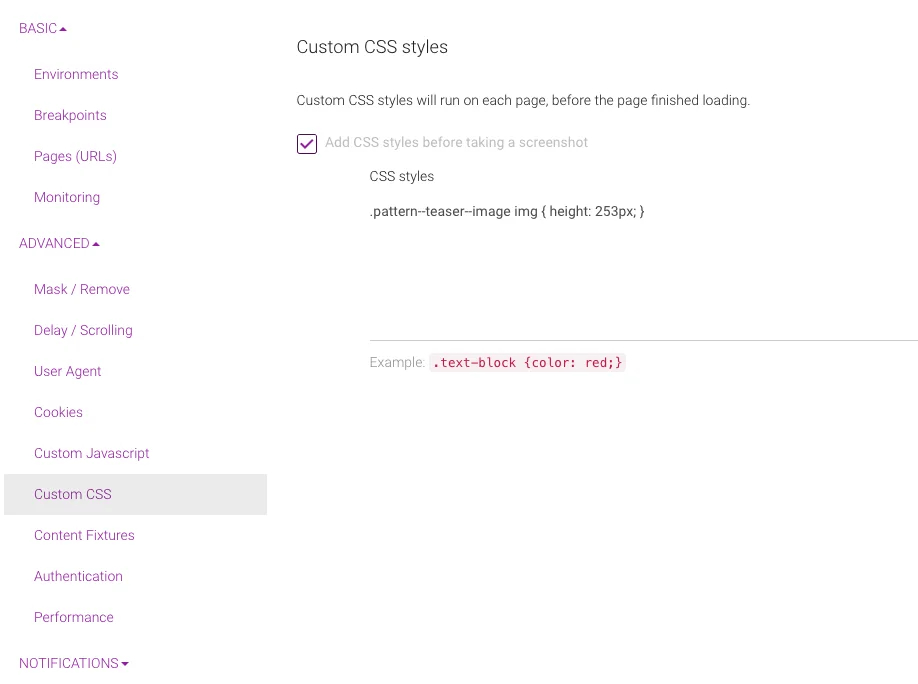
There is still a problem. The blocks have slightly different heights, because the original images were different heights. Left alone, that means a new article with a taller image produces a diff that is not a regression.
So combine the two techniques — fixtures for the content, custom CSS to pin down the dimensions:
 Content Fixtures Applied and CSS
In Project Settings, the configuration looks like this. Same old CSS selectors:
Option 5: Sync the environments
If you are comparing production against staging, a large share of your diffs are content diffs rather than code diffs. Copying the production database down to staging before a test run removes that whole class of noise at once, and it is often less work than configuring fixtures for every dynamic block on the site.
The limitation is that it only helps when you control both sides. If you take screenshots from production on a schedule and editors publish throughout the day, there is nothing to sync against — you are comparing production to its own past. That is the case fixtures were designed for.
Capture-level false positives are a different problem
Everything above assumes the screenshot is a fair picture of the page. Sometimes it is not, and no amount of masking will help, because the problem happened before your CSS ever ran.
The usual suspects are a CDN serving a challenge page to the screenshot bot, a cookie banner that fired on one capture and not the other, a web font arriving late and squashing the layout, and images that never resolved. The comparison is technically correct and completely uninformative.
Diffy runs an AI check over captured screenshots to catch exactly this: it looks for blocking popups, CDN challenge pages, stretched elements, misplaced content and unloaded media, and surfaces the actionable ones as recommendations. If the cause is your CDN, the fix is allowlisting our screenshot IP rather than anything in your test configuration — the docs cover bypassing protection on Cloudflare, CloudFront and Incapsula.
Not every diff you did not expect is a false positive
Worth saying plainly: a change you did not anticipate is not automatically noise. Vertical shifts are the common example — one element grows by a few pixels and everything below it moves, so the diff lights up the entire lower half of the page. That looks like noise and reads like noise, but something did change, and Diffy reports vertical shifts separately so you can see the cause rather than the consequence.
Before suppressing anything, confirm you are looking at genuine nondeterminism rather than a real regression with a dramatic footprint. Our rundown of common visual bugs automated testing catches is a useful reference for telling the two apart.
A workflow that keeps the noise down
- Run the suite twice against the same environment, changing nothing. Every diff that appears is nondeterminism by definition. This is the fastest way to build your list, and it takes minutes.
- Fix by category, not page by page. One CSS rule hiding the chat widget usually clears dozens of pages at once.
- Prefer fixtures to masking for real content, and masking to removal for third-party embeds.
- Set a clean baseline once the suite is quiet. A baseline set of screenshots is only as good as the run it came from — pin it after you have removed the noise, not before.
- Re-check after redesigns. Selectors rot. A stabilization snippet that silently stops matching is worse than no snippet, because you will not notice until the diffs return.
Getting a suite from noisy to quiet is usually an afternoon of work, and it is the difference between a test people trust and a test people ignore. If you have a case that does not fit any of the categories above, send it our way — we have stabilized hundreds of sites and are happy to take a look.